Web development would not be the same if HTML hadn't had a table tag. In the days before CSS, they were the only way to create multi column layouts, visually appealing menus and turn those pixel-perfect print-inspired screen designs into something people can see on the web. For years all developers found tables to be a necessity, Using the loose standards of most browsers, developers force browsers to display tables correctly and generally thought that they had the "web development" thing licked.
Tables use <table>, <tr>, and <td> elements. The elements are controlled with the attributes align, valign, background, bgcolor, rowspan, colspan, cellpadding, cellspacing and border.
<table></table>
The <table> tag is used to designate that this element is a table. A table is a structural presentation of data or information using rows and columns. These allow you to insert tables. It has the following options:
The insides of the table are constructed using the tr, th, td, and the caption tags. There are also three table tags that were released with version 4.0. They are tbody, tfoot, and thead. Tables include the following tags with their associated options:
Cell <td> attributes
A typical Table
<table width="200" border="1" cellspacing="0" cellpadding="0">
<tr> <!-- row 1 -->
<td>cell 1</td>
<td>cell 2</td>
<td>cell 3</td>
</tr>
<tr><!-- row 2 -->
<td>cell 4</td>
<td>cell 5</td>
<td>cell 6</td>
</tr>
<tr><!-- row 3 -->
<td>cell 7</td>
<td>cell 8</td>
<td>cell 9</td>
</tr>
</table>
Using Tables for more than the were intended...
If you analyze the web you will find that a lot of pages, I mean about half, are still built using tables. That doesn't mean it is the best practice, but it does mean that tables are still very important. Even if you use tables for displaying data only, you need to use tables. When it comes down to the basics, a table is simply a way to display data.
Over time, the W3C extended the original HTML table specification by adding some more structural elements and attributes (thead, tfoot, th, tbody, caption, summary, axis, headers, and most recently scope). The "scope" attribute has made it very easy to distinguish the parts of a table that are headings and footings.
| The problem with using tables for presentation is that they mix presentational data with your content. | |
| 1 | This makes the file sizes of your pages unnecessarily large, as users must download this presentational data for each page they visit (Bandwidth ain't free). |
| 2 | This makes redesigns of existing sites and content extremely labor intensive (and expensive). |
| 3 | It also makes it extremely hard (and expensive) to maintain visual consistency throughout a site. |
| 4 | Table-based pages are also much less accessible to users with disabilities and viewers using cell phones and PDAs to access the Web. |
The advantage of tables is that they are relatively easy to build, they are easily styled, and they actually do load fast.
Using Tables for page presentation is not necessarliy a best practice, but it is not necessarily wrong either, your page can still be well formed, and the user will never know the difference. The call is yours. There are arguement for both...
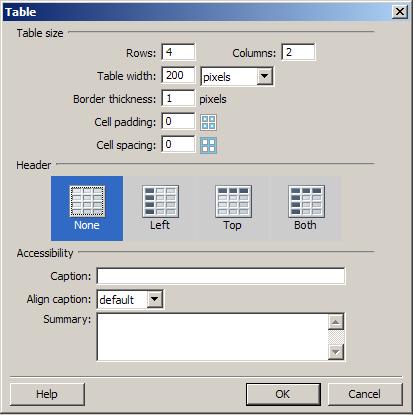
Most IDEs make table layout relatively easy. Dreamweaver is no different.
When styling tables, a table behaves like a block-level element with their own content, padding, margin, and border areas,etc. Furthermore, the nested elements (<tr>, and <td>) also act like a block-level elements.
Dreamweaver has made the design and development of tables very easy. On the common toolbar there is a table icon that steps you through the process (or you can select tables from the Insert tab on the main menu).
This process is further explained in the next lecture.